What goes in a splicing closeout package
The splicing is done. The cans are sealed and mounted. Now the office needs the paperwork, and the job isn’t really finished until the closeout package is in.
For most crews this is the part that drags. Photos are spread across three phones. Splice counts live on a notepad in somebody’s truck. Notes went out by text. Somebody spends Friday putting it back together and finds out an enclosure is missing a photo after the crew has moved 40 miles down the road.
This page covers what a splicing closeout package typically needs, how to keep it straight per enclosure, and why the easiest closeout is the one you build while the work is happening.
What a closeout package typically includes
Every owner and prime contractor has its own spec, so treat this as a starting list and check it against the job’s requirements. Most splicing closeouts ask for some version of the following.
As-builts and markups
The design almost never survives the field untouched. A route changes, a splice point moves, a tail gets longer. The as-built shows what was actually built, usually as redlines or markups on the print. If the markup doesn’t match the enclosures you turned in, expect questions.
Splice details and counts per enclosure
For each enclosure: which cables came in, which fibers were spliced to which, and how many splices were made. Count per enclosure, not per job. A job total of 288 tells the office nothing about which can is short.
Photos
Splice closure photos are how the office and the owner see work they will never stand next to. A typical set covers the enclosure label, the location, the open closure, each tray, and the sealed closure mounted in place. See our splice closure photo checklist for a full shot list crews can use.
Notes
Anything the next person needs to know: a damaged duct, a tail left short, a fiber that was already dark, access problems at a vault. Notes written at the can are specific. Notes written from memory a week later are not.
Time
Hours on each enclosure or each day, depending on how the job is billed and tracked. Time recorded against the enclosure is easier to defend than a single number for the week.
Sign-off
Whoever reviews the package on your side signs off that it’s complete before it goes out. On some jobs the owner’s inspector signs as well.
Why closeouts get rebuilt instead of read
The information in a closeout package almost always existed at the can. The tech knew the count, took the photos, saw the problem. It just didn’t get written down in one place at the time.
So it gets rebuilt later. Someone matches photos to enclosures by timestamp. Someone calls the crew to ask what the count was on the vault at the corner. Someone redraws the markup from a blurry picture of a print. Every step is a chance to get it wrong, and every wrong item comes back as a rejection or a held invoice.
The fix isn’t working harder on Friday. It’s capturing the work in a way the closeout can be read from later.
Organize splice documentation by enclosure
A splicing job isn’t one task. It’s a list of enclosures: vaults, poles, handholes, pedestals. Good splice documentation follows that structure.
When each enclosure has its own record, the questions the office asks have straight answers:
- Which enclosures are done?
- Which ones are still open?
- Which ones are missing something the closeout needs?
When everything for the job sits in one folder or one text thread, nobody can answer those without digging.
A simple rule that helps on any job, with or without software: nothing about an enclosure leaves the site unless it’s tied to that enclosure’s ID. Photos named or tagged by enclosure. Counts written next to the enclosure ID. Notes that say which can they’re about.
Capture at the can, build the closeout from the record
This is the idea SpliceFlow is built around. A lot of fiber splicing software starts from the design or the project schedule. SpliceFlow starts at the can: it is the contractor’s capture and closeout record for the enclosure. It is not a GIS and not a project management tool.
On a SpliceFlow job, the tech records the work on the enclosure record while standing at the can: the ticket and job info, splice details and counts, photos, notes, and time. That record is what the closeout is built from. Nobody has to go back and rebuild it from a camera roll.
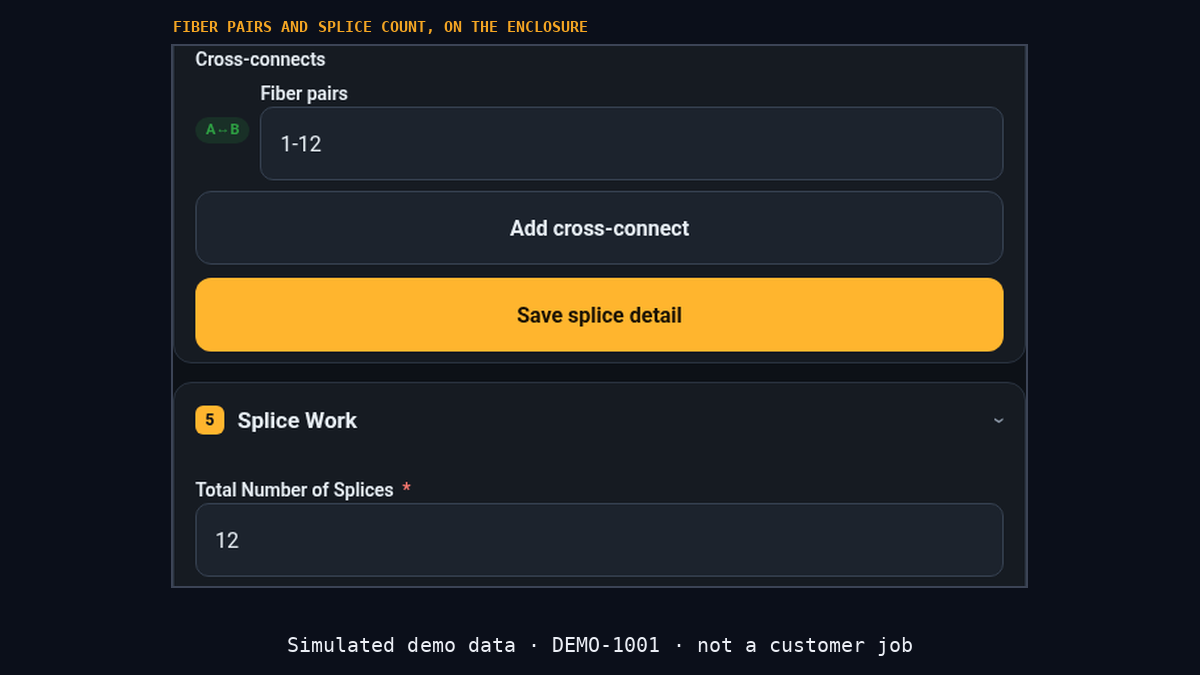
What that changes in practice:
- Counts are per enclosure from the start. The splice count is entered on the enclosure where the splices were made.
- Photos sit with the enclosure they belong to. Nobody has to match them up later by timestamp.
- Gaps are easier to catch on site. When everything for an enclosure is in one record, it’s plain to see what isn’t there yet while the crew can still go back, not after they’ve left the area.
The closeout package still needs a human to review and sign off. What goes away is the reconstruction.
A quick closeout checklist for each enclosure
Before you call an enclosure done, check that you have:
- Enclosure ID that matches the print
- Location context (address, pole or vault number, or nearest landmark)
- Splice details: cables in, fibers spliced, splice count
- Splice closure photos: label, location, open closure, each tray, sealed and mounted
- Markup of any change from the design
- Notes on anything unusual
- Time recorded for the enclosure
- Reviewed and signed off on your side
If all eight are on the enclosure record before the crew leaves the site, the closeout is mostly done by the time the last can is sealed.
Request an invite
SpliceFlow is invite-only right now, and we onboard splicing companies one at a time. Walkthroughs use a simulated demo job, DEMO-1001, not a customer job.
If you run a splicing crew or a fiber contracting company and want to see how the enclosure record works, register at spliceflow.app or email spliceflowcontracting@gmail.com.
Register with us
Company invite queue. Not a self-serve tech account.