Field documentation for fiber splicing companies

Capture the splice once.
Closeout comes with it.

Enclosures (closures), splices, photos, and time in one splice log. DLR stays with the job until a PM attaches the CAD schematic on the enclosure, so as-builts, closeouts, and production reports are not a Friday scramble.

Built by a working splicer. Not a software company guessing at the workflow.

Simulated job data
What it does

One splice log, at the enclosure

Spreadsheets, group texts, and shared drives weren't built for splicing work. SpliceFlow is.

01 · ONE JOB RECORD

Counts, photos, notes, time

Office sees the same record the tech just logged. One job, one enclosure, one source of truth.

02 · AT THE SPLICE POINT

Photos sit on the enclosure. DLR is on the job

A PM attaches the CAD schematic on the enclosure (A/B, ticks, span IDs). Until then it is paperwork on the job, not a drawing already on the can.

03 · CLOSEOUT FROM THAT RECORD

As-builts, closeouts, production

Built from what was captured. Missing items show on that record.

Inside the app

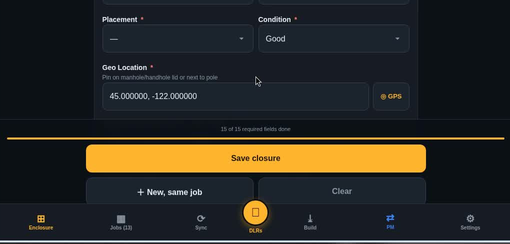
Counts and photos on that enclosure

Photos and counts sit on that can. DLR is paperwork on the job until a PM attaches CAD on the enclosure.

Every active job, its enclosures, and closeout status at a glance.
Simulated DEMO-1001: PM published markup on a job photo, not the CAD schematic. Not a customer job.
PM marks up a job photo and publishes it — not the CAD schematic. Techs ink that schematic after a PM attaches CAD on the enclosure. Simulated DEMO-1001, not a customer job.
Closeout from that capture. Missing items show on the record.
Simulated DEMO-1001: SpliceFlow enclosure capture. Synthetic golden job, not a customer site.
Simulated enclosure capture — DEMO-1001, not a customer job.
Simulated DEMO-1001 OSP splice schematic (CAD): A/B, splice ticks, span IDs, fiber counts. Not a customer job.
For the office

Closeout from that record, not a Friday scramble

  • Status without the phone tagThe office sees the same enclosure record.
  • Documentation that's actually therePhotos and counts on the enclosure. DLR on the job, not in a text thread.
  • Closeouts that don't bounceMissing items show on that record and on the packet, not after the invoice.
For the crew

Fast enough to use with gloves on

  • Log it once, at the splice pointCounts, photos, notes. DLR stays with the job.
  • No end-of-week paperwork pileCloseout comes from that enclosure record, not a Friday pile.
  • Works the way splicing worksTrays, ribbons, closures, DLR — the app speaks the trade.
From the founder

From the founder

“I splice fiber for a living. SpliceFlow exists because good crews and good coordinators still lose hours every week chasing photos, DLR, counts, and closeout paperwork across three apps and a text thread. This is the job record both sides of that handoff actually needed.”
— Built by a splicer · U.S. Army veteran
FAQ

FAQ

What this page is allowed to say today.

WHAT IT IS

What gets captured at the enclosure?

Counts, photos, and time on the enclosure. DLR is the CAD OSP splice schematic: paperwork on the job until a PM attaches it on the enclosure (A/B, splice ticks, span IDs, fiber counts). Simulated DEMO-1001. Not a test-report engine.

WHAT IT IS NOT

Does this replace my PM or tester?

Keep the PM and tester tools you already pay for. We take the splice those tools don’t hold. Invite-only — the public door is this waitlist.

THE WALK

Is this a live production walk?

Walks use a synthetic golden job. We do not claim field-proven, a live customer job, or a perfect production walk yet.

DLR

What do you mean by DLR?

On this site, DLR is the CAD OSP splice schematic (A/B, splice ticks, span IDs, fiber counts). It lives as paperwork on the job until a PM attaches it on the enclosure. Simulated DEMO-1001. We do not parse OTDR .sor files or run a test-report engine. Not a loss-reading photo. Not Device Level Ring. Not Dynamic Line Rating.

Early access

Join the waitlist

If you run splicing work, you go to the front. We will write when a walkthrough is ready.

No spam. No date. We will be in touch.

> EMAIL LOGGED. We will be in touch.